20 practical presets
Start with Vocal - Lead Space, Snare - Plate Bloom, Piano - Concert Hall, Pads - Deep Space, or presets for guitars, drums, synths, strings, bells and creative FX.

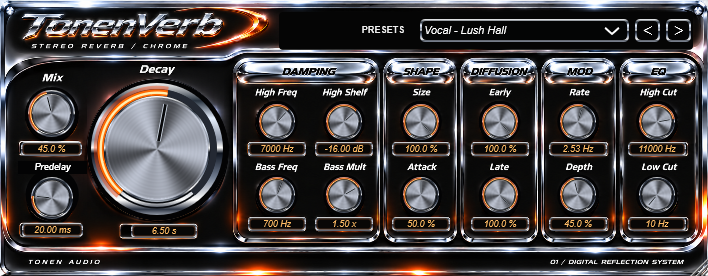
Give vocals room to breathe and turn instruments into wide, immersive spaces. Shape the tail with detailed bass and treble damping, smooth modulation, and 20 presets named for what you are working on.
One-time purchase · Windows 64-bit · VST3 + standalone
Stripe checkout · Download after payment.
WINDOWS 64-BIT · VST3 + STANDALONE
Compact, resizable 708 × 276 chrome interface. Windows package only.
Start with Vocal - Lead Space, Snare - Plate Bloom, Piano - Concert Hall, Pads - Deep Space, or presets for guitars, drums, synths, strings, bells and creative FX.
Adjust Mix, Predelay, Decay, Size and Attack. Set separate bass and treble decay behavior, refine diffusion, and finish with wet-only High Cut and Low Cut.
Build lush tails with controllable modulation. The latest clean-audio build removes intentional wet-path saturation and adds stereo-linked peak protection.
All 15 front-panel controls support host automation and project recall. Static chrome artwork, editable value readouts, double-click reset, and hover explanations keep the controls straightforward.
C:\Program Files\Common Files\VST3.Includes the Windows standalone app, installation notes, and source. No macOS or Audio Unit build is included.